
Free Fire ID Search: How to Find Any Player by UID or Name (2026 Guide)
If you want a Free Fire ID search that actually works, here’s the short answer: the reliable way to find a player is with their numeric UID using the in-game Add-by-ID feature, not a magic website. There is no official Garena tool that lets you type a stranger’s name and pull up their account, because in-game names aren’t unique and Garena keeps that data private. So the honest path is UID first, name second — and I’ll show you both, plus how to spot the fake “checker” sites that just want your password.
I’ve added, searched, and squad-hunted more IDs than I can count, so this guide skips the fluff. You’ll get the exact taps for finding your own UID, how a real Free Fire player lookup works, what a public player profile truly reveals, and where the scams hide. If you also came here to sharpen your in-game identity, our Free Fire name generator on the homepage is a fast way to grab a stylish tag, and we’ve got dedicated lists for stylish guild names and cool boys and girls names once you’ve sorted the search side of things.
Quick reality check before we dig in: a Free Fire ID search shows public stats and cosmetics, never private login details. Anyone promising email, phone, or password access via UID is lying — keep that in your back pocket for the whole read.
How Free Fire ID Search Really Works in 2026
Every Free Fire account carries one permanent identifier — the UID, a numeric string usually running 8 to 12 digits. That number is the backbone of every legitimate search. Nicknames get changed with a Name Change Card, two players can share the exact same tag, and Garena never published a public name-lookup, so the UID is the only thing that points at one specific account with zero ambiguity. Get comfortable with it and the rest of this becomes easy.
It helps to think of a Free Fire ID search as two very different jobs. One is finding your own account details — trivial, built into the game, done in seconds. The other is finding someone else’s — which is only as easy as the information you already hold. If you have their UID, the game does the work for you. If all you have is a nickname you saw once, you’re mostly out of luck, and no amount of googling changes that. Keeping those two jobs separate in your head saves a lot of wasted time chasing tools that can’t deliver what they advertise.
Find Your Own Free Fire UID in Seconds
Grabbing your own UID takes about ten seconds, and you’ll need it constantly — for tournament sign-ups, diamond top-up on the official site, support tickets, and letting a squadmate add you back. Your avatar sits in the top-left corner of the lobby, and everything you need lives one tap behind it.
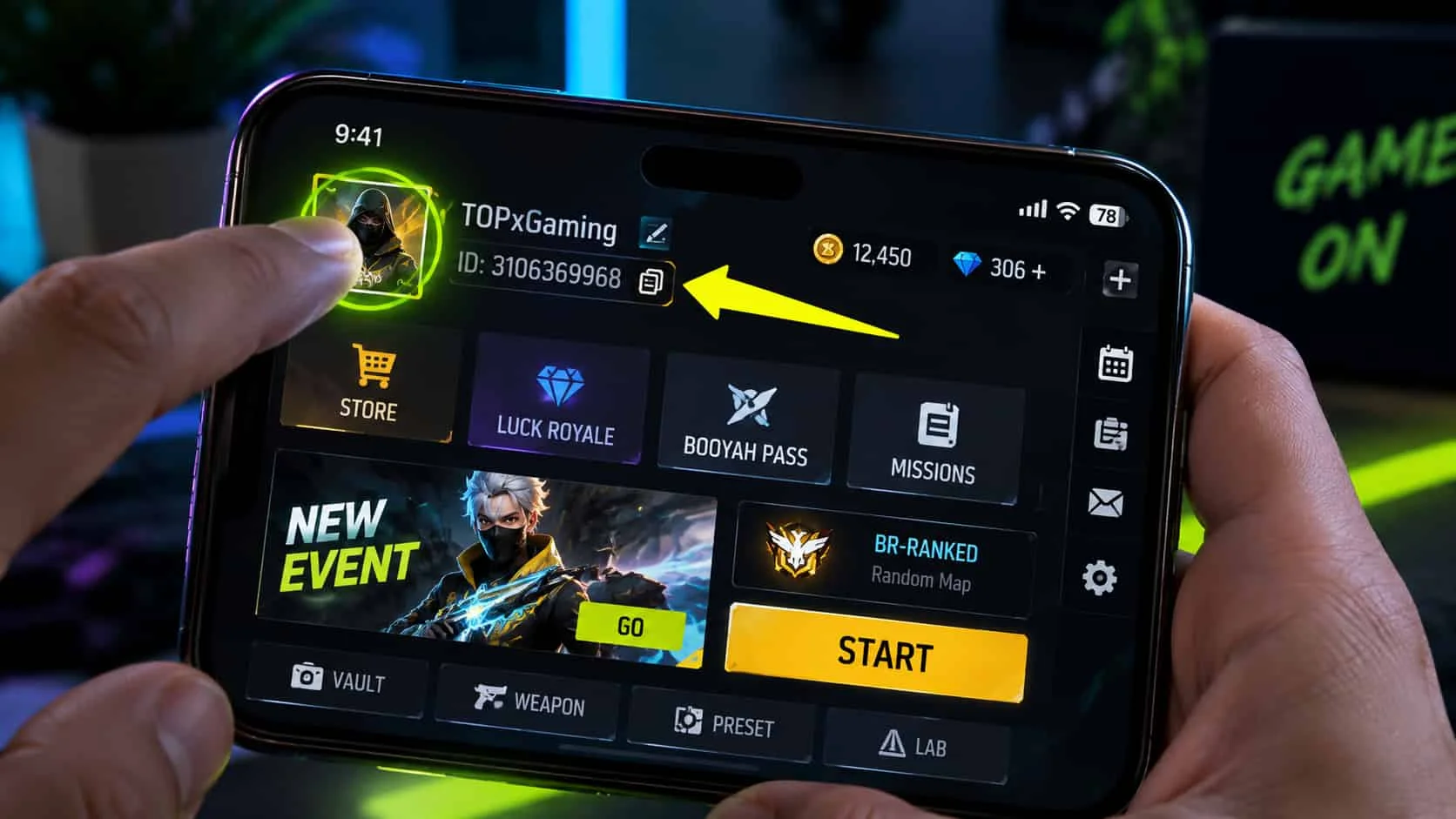
Here’s the exact flow:
- Open Free Fire and wait for the main lobby to load.
- Tap your avatar (the circular profile picture) in the top-left corner.
- Your profile card opens with your in-game name front and center.
- Look directly under the name — the UID is the row of numbers there.
- Tap the small copy icon beside it so you don’t fat-finger a digit.
That copy button matters more than it looks. One wrong digit during a diamond purchase sends your money to a stranger’s account, and Garena treats those transfers as final. Copy, paste, double-check — every single time.
Search and Add Another Player by ID
This is the closest thing to a true Free Fire ID search inside the game. If you know someone’s UID, the Add-by-ID function in your friends menu pulls them up directly — no browser, no sketchy third-party site, no login gymnastics. It’s how pros exchange IDs after scrims and how you re-add that random who clutched your last Battle Royale match.
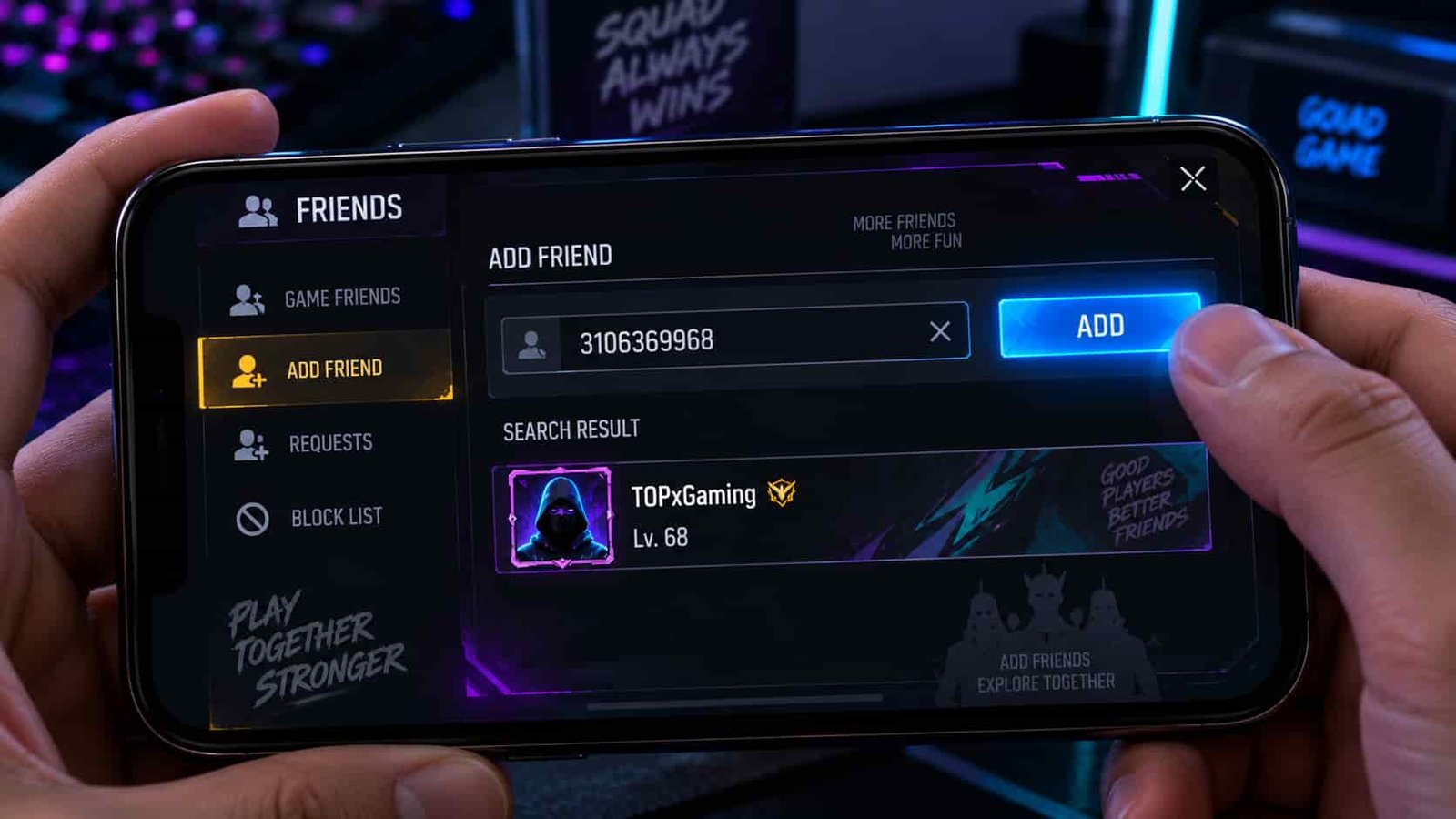
Walk through it like this:
- From the lobby, open the friends panel (the people icon, usually top-right).
- Tap the Add or “Add Friend” tab.
- Choose the search field and type the player’s UID exactly.
- Hit search — their card appears with name, level, and avatar.
- Send the friend request; once accepted, you can view more of their profile and invite them to a squad.
Two honest caveats. First, some players lock incoming requests, so a valid UID can still return “cannot add.” Second, region can matter — accounts on different servers don’t always mix freely for adds or invites. If the search fails, the UID isn’t necessarily wrong; the account may simply be private or on another server.
What a Player’s Public Profile Actually Shows
Once you land on someone’s player profile, the visible data is genuinely useful but deliberately limited. You’ll see their public identity and flex-worthy stats — and nothing that could compromise the account. This is the single biggest thing competitors gloss over, so let’s be blunt about the line between public and private.
| Info on a public profile | Visible? |
|---|---|
| In-game name | Yes |
| Level | Yes |
| Rank (BR / CS) | Yes |
| Likes | Yes |
| Guild | Yes |
|
Cosmetics / equipped skins |
Yes |
| Email address | No |
| Phone number | No |
| Password | No |
So a Free Fire player lookup tells you who someone is in the game — their rank in Battle Royale and Clash Squad, how many likes they’ve collected, which guild banner they rep, and the cosmetics they’ve equipped. What it never exposes is anything tied to account ownership. No legitimate feature, official or otherwise, surfaces an email, a phone number, or a password from a UID. If a tool claims it can, that’s your cue to close the tab.
Worth knowing: not everything on a profile updates the instant a match ends. Stats like rank points and likes refresh on the game’s own schedule, so if you check a friend right after a ranked grind and the number looks stale, that’s normal — give it time rather than assuming the lookup broke. Players can also toggle certain privacy options, meaning a locked account may show only the bare basics: name, level, and avatar. That’s not a failed search, it’s a player who’d rather not display their full loadout, and it’s their right.
Can You Find Someone by Name Only?
Short version: not really, and anyone telling you otherwise is selling something. Free Fire names are not unique — hundreds of players can run the same tag, styled fonts included — and Garena never built a public directory you can search by nickname. There’s no official “type a name, see the account” box anywhere in the game or on ff.garena.com.
So what can you actually do with just a name? Realistically, three things. If the player is already in your friends list, your match history, or a shared guild, you can open their profile from there and read their UID off it. If you spotted them in a recent lobby, check your recent-players or match results and open the profile that way. And if all you have is a screenshot of a stylish tag, the best you can do is recreate the look — which is exactly what a tag generator is for — not locate that specific stranger. Treat “search any player by name” as marketing fiction; the UID is the real key.
There’s one more scenario people ask about: finding a specific streamer or pro by their on-screen name. Same rules apply. Creators who want to be added usually post their UID in a video description, a pinned comment, or their social bio precisely because the name alone won’t get you there. If you can’t find a UID they’ve shared publicly, that’s a sign they’d rather not be added — and typing their nickname into a random “finder” site won’t change that, it’ll just feed a data-scraping page. Chase the UID they chose to share, not a name you’re hoping to reverse-engineer.
Third-Party ID Checkers: Safe or Scam?
Let’s talk about the elephant in the room. Search “Free Fire ID search” and you’ll drown in third-party ID checker sites promising instant stats from any UID. Some are harmless stat viewers pulling public player profile data — the same name, level, rank, and guild you’d see in-game. The problem is telling those apart from the predators, and the predators are everywhere.
Here’s my rule, learned the hard way: a safe checker asks for a UID and shows you public stats, full stop. A scam asks for something more. The red flags are consistent —
- It requests your login, password, or Facebook/Google credentials to “verify” a lookup.
- It promises free diamonds, a “diamond generator,” or account recovery via UID.
- It claims to reveal a player’s email, phone, or password.
- It demands payment before showing results, or buries you in redirect pop-ups.
Never, ever type your Free Fire or Garena password into any site that isn’t the official game client or the official Garena login. Password-harvesting through fake checkers and diamond-generator pages is the number-one way accounts get stolen, and no UID lookup on earth requires your credentials. When in doubt, do the search inside the game with Add-by-ID and skip the browser entirely — it’s slower by maybe thirty seconds and infinitely safer.
Protect Your Own ID From Lookups
Flip the perspective for a second. Sharing your UID by itself is safe — it’s designed to be shared, the way you’d hand out a username. The danger only shows up when your UID travels alongside things it shouldn’t, so a little discipline keeps your account locked down.
A few habits I swear by: bind your account to a secure login method through the official in-game settings so recovery is actually possible; never pair your UID with a password, verification code, or OTP in any chat, comment, or DM; and be wary of “free diamond” offers that ask for your UID and login — the UID is the bait, the login is the theft. If you ever genuinely lose access, report it only through official Garena support. There is no legitimate way to recover or “hack back” an account using a UID alone, and every service claiming otherwise is running a scam. Your UID is public; your credentials are sacred — keep that wall up and a Free Fire ID search can never hurt you.